Acuity Production Scheduler is work center and machine scheduling for Acumatica ERP. Drag production operations onto real machines down to the minute, see where you have open capacity, and write the schedule back to Acumatica. No customization project, no spreadsheet exports, no duplicate data entry.
Acuity reads production orders, operations, work centers, machines, shift calendars, and warehouses straight from your Acumatica instance. No customization project, no exports, no duplicate entry.
Every machine gets a row. Every operation gets a block. Drag a block to a different machine or a different hour and Acuity recalculates start, end, setup, run, and finish as you move it. Firm the jobs that can't move. Pull work off the board when plans change.
Changes stay on the board until you commit them. Write back one operation or every pending change at once, and Acuity keeps a running count of what hasn't been written yet — so the schedule your team is looking at and the schedule in your ERP never quietly drift apart.
Machine-level production scheduling for Acumatica manufacturers. Everything below runs on live ERP data — no middleware, no nightly file drops, no duplicate entry.
Machines down the left, time across the top, one block per operation. Shift, day, week, and month views. Filter by order or item, color by status, undo anything. It reads like the calendar your team already knows — except you're booking machines instead of conference rooms.
Operations land on a specific machine at a specific time, down to the minute. Dragging snaps to five-minute increments so blocks land clean, and you can type an exact start time when you need one. Setup, run, and finish times are broken out, queue and move offsets are respected, and drops anchor to either the start or the finish of the block you're moving.
Stop scanning the board for a gap. Ask the system instead: show me every opening on the filling lines between Tuesday and Thursday that's at least two hours long. Acuity returns each machine, window, and duration — with optional overnight carry-over — and drops you onto the board at that moment.
Sanitation, preventive maintenance, tooling changes, plant holidays, a line that's down until Thursday. Block time on a single machine, a whole work center, or the entire warehouse, and capacity gets recalculated everywhere it matters.
Orders, operations, work centers, machines, quantities, and due dates flow in automatically. Schedule changes flow back out to Acumatica. There is no manual sync step, no CSV round trip, and no reconciliation meeting to find out what actually changed.
Lay out your plant once on a 2D floor plan — drag machines into work center zones the way they actually sit on the floor — then watch it run. Every machine shows running, changeover, down, idle, or off shift, with the order number and percent complete. Scrub the time cursor to see any moment of the day.
Released and planned orders that haven't been placed sit in a tray under the board with their item, quantity, work center, duration, and due date. Drag one onto a machine row to schedule it. What's left in the tray is your real backlog.
Capacity is calculated against each machine's own shift calendar, so nothing gets scheduled into a gap that doesn't exist. Filter the whole board to one warehouse or look across all of them. Outside-processing work centers are handled separately, without finite capacity.
The board is for the scheduler. The report is for everyone else. Filter to a work center, a date range, or a status, then export or print a clean schedule list — the cook schedule for the kettles, tomorrow's run order for the filling lines — and hand it to the floor.
Three ways to look at the same day: the board you schedule on, the capacity you have left, and the floor as it's actually running.
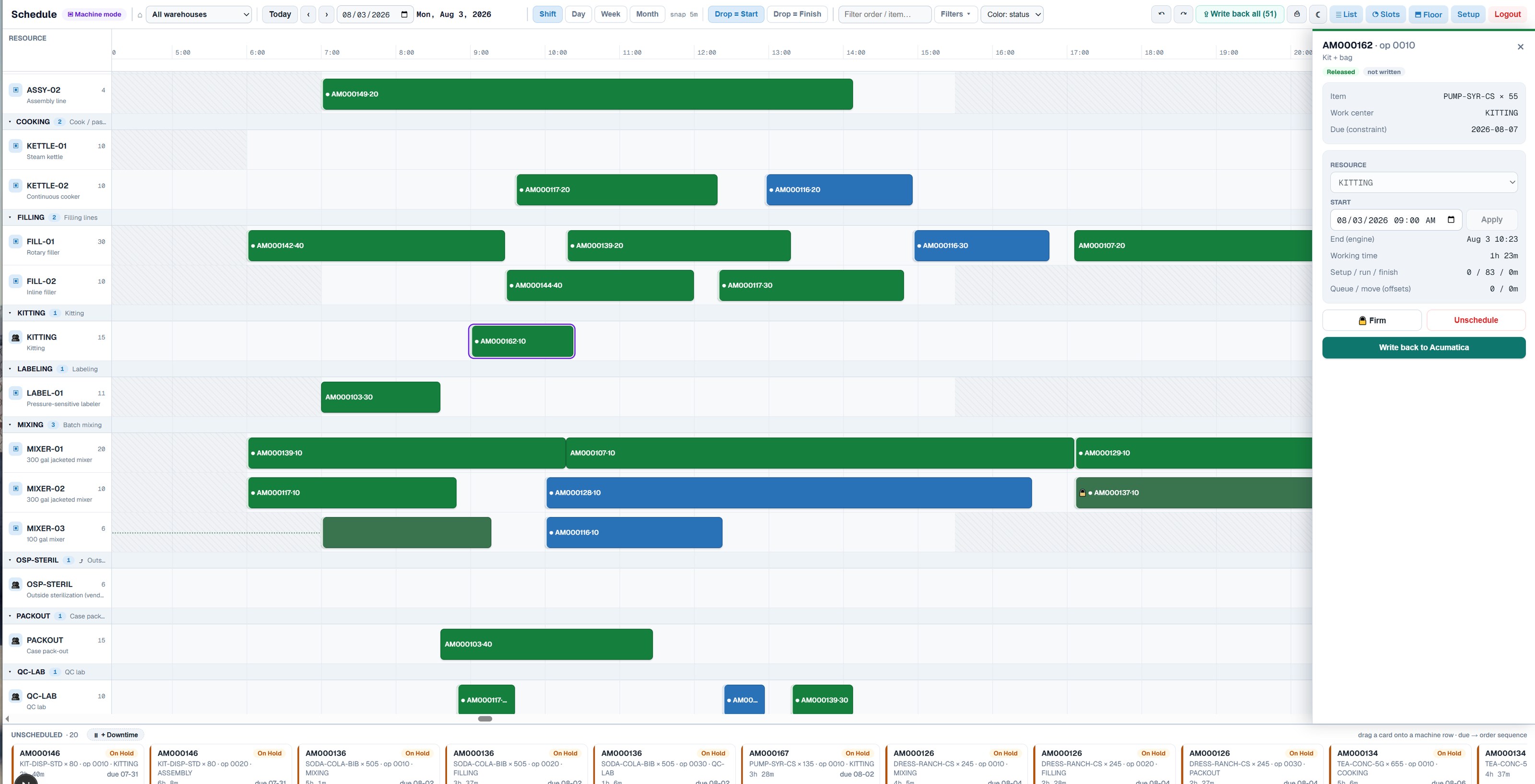
The schedule board. Work centers and machines down the left, the shift across the top, every Acumatica operation as a block you can drag. Click any block to change its machine or start time, firm it so it stops moving, unschedule it back to the queue, or write it straight back to Acumatica. The pending write-back count sits in the header so nobody has to guess whether the ERP is current.
Click to enlarge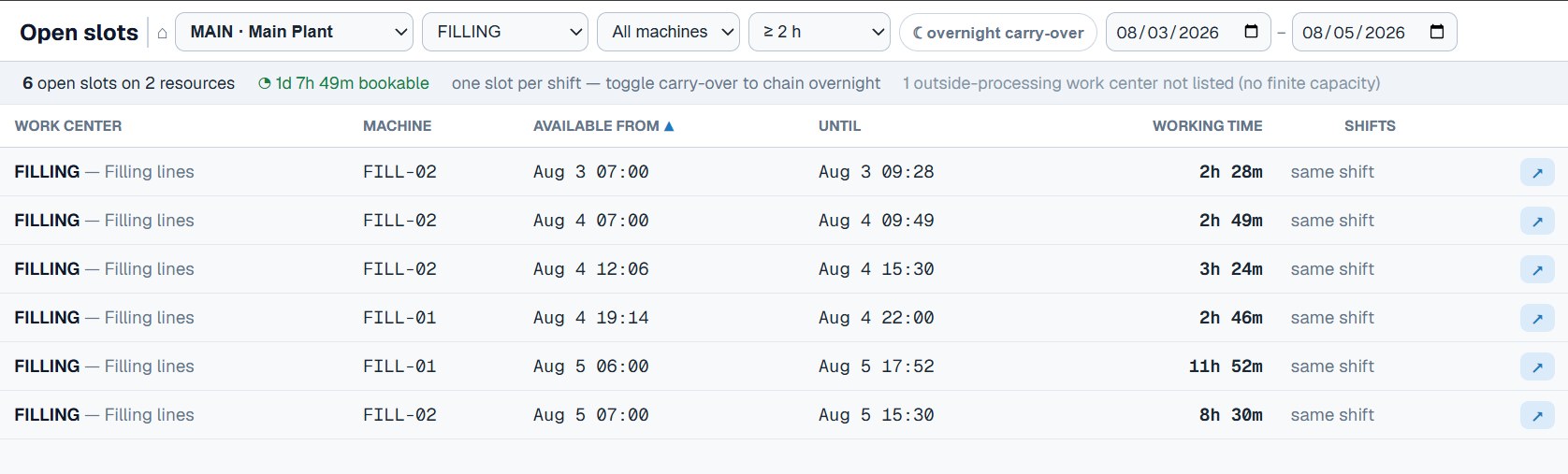
Open Slots. "I need four hours on a mixer this week — where does it fit?" Pick the warehouse, work center, minimum block length, and date range, and Acuity lists every bookable opening with its exact window and duration. Turn on overnight carry-over to chain across shifts. It's the question schedulers actually ask, answered without reading a single Gantt chart.
Click to enlarge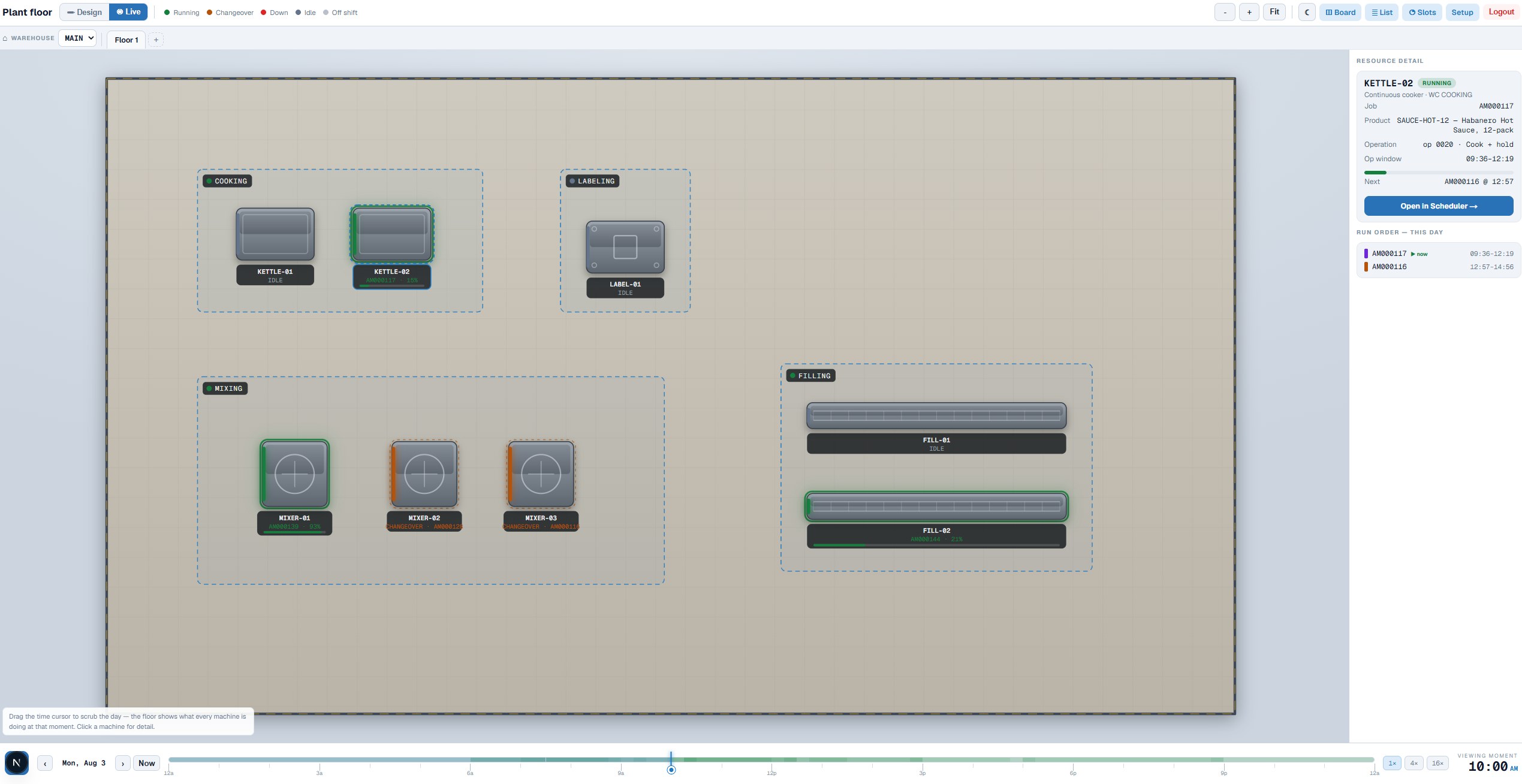
The plant floor. Arrange your machines and work centers on a 2D floor plan once, then leave it up on a monitor. Green is running, orange is changeover, red is down, grey is idle. Click a machine and the panel tells you the job, the product, the operation, how far through it is, and what’s queued behind it — with a jump straight to that block on the board. Click nothing and you get the whole floor at a glance: how many machines are running, in changeover, down, or idle at this moment. Drag the time cursor to replay the day and see exactly where the plan went sideways.
Click to enlargeThe hardest question a customer asks has two halves. Do I have the material, and if not, when can I get it? And even if I do — do I have a machine free to run it?
Acuity MRP explodes the BOM, checks every component against on-hand and incoming supply, identifies the bottleneck part, and returns the earliest feasible date and the maximum quantity you can commit to.
Acuity Production Scheduler holds the other half: what every machine is committed to, minute by minute, and where the real openings are between now and the date you're being asked about.
Run both and the two answers become one. Material availability and finite machine capacity checked together, so the date you give the customer is a date the plant can actually hit — not an availability date with a scheduling problem hiding behind it.
Labor and crew capacity work the same way, and the board is built to handle it. We're holding it until customers tell us it's the next thing they need — if that's you, say so and it moves up.
Acuity MRP is time-phased material requirements planning built on the same principle — live Acumatica data, no customization project. Multi-level BOM explosion, available-to-promise dates, demand forecasting, inventory calendars, and AI explanations for every suggested order.
Request a demo and we'll walk through Acuity Production Scheduler running on real production data — the scheduling board, the open capacity finder, and the write-back to Acumatica.
We'll reach out within 24 hours